As Generative AI is gaining traction in the tech field, designers around the world are wondering how generative AI can be used in product design. Will AI become a part of the creative process as co-creators or as replacements to human designers? Personally, I believe we are approaching a new way of doing design. Generative AI tools are blurring the boundaries between design and development, with tools such as Claude Code, Cursor, and Figma Make.
Related: Figma MCP Servers and the Future of Designer-Developer Handoff
Last updated: March 2026
Generative AI tools for Design
During the past few years, I’ve made an effort to try as many generative AI tools as possible, focusing on AI-assisted design workflows.
Some of the tools I’ve tried include:
- ChatGPT (LLM)
- Claude (LLM)
- Claude Code (AI code agent)
- Cursor (AI code agent)
- Figma Make (vibe coding for design)
- Lovable (vibe coding for web design)
- Replit (AI app builder and agentic AI)
- Canva (AI for graphic design)
- Adobe Photoshop and Adobe Illustrator (AI photo and illustration editing)
- MidJourney (AI images)
- Leonardo AI (AI images)
- Blender AI Render Plugins (AI 3D modelling)
- Pika Labs (AI video generator)
- Runway (AI video generator)
- Eleven Labs (AI voices)
- Sana (AI work agent assistant)
- N8n (AI workflow automation)
- Microsoft Copilot (AI companion)
- and more
You can read about my explorations with image and sound generation software here: How useful is Generative AI for Creative Work?
What genuinely surprises me is the speed of development. Just a few years ago, the designs I generated with tools such as ChatGPT and Midjourney were laughable. They were nowhere near something that I would use in a paid design project. They were not up to the most basic standards. However, during 2024 and 2025, generative AI tools such as Figma Make and Lovable were released. Suddenly, the ability of these tools had made a huge jump. Honestly, for an untrained eye, the types of websites that can be generated with these tools are now rivaling those created by professional designers.
This rapid development indicates that we have not seen the end of improvements for generative AI tools for design. If such huge improvements can happen in two years, what wouldn’t be possible in 5, 10, or 20 years from now?
How Generative AI can be used in Product Design

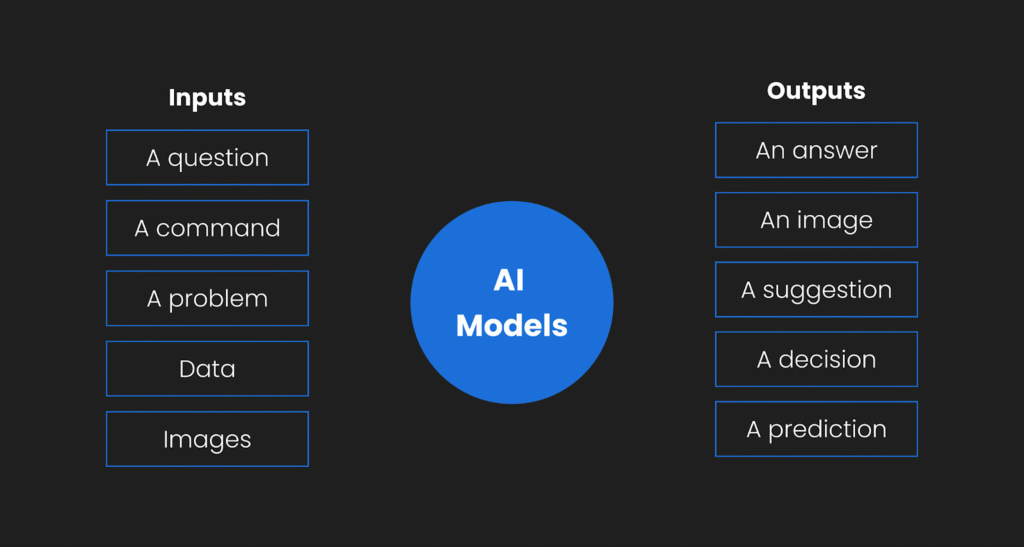

The use of generative AI tools in the design workflow is still in its infancy. We are still at a stage where designers are experimenting with how it can be used in different parts of the design process. In this section, I’ll present examples of how AI could be used across various design phases, from research to ideation, content creation, code development, and as an assistant.
Read also: How Generative AI is Revolutionizing Design Workflows
Research phase
In the early stages, LLMs such as ChatGPT and Claude can be used for brainstorming. Since LLMs have been trained on so much data, you can ask it to do research for you, or even search the web for similar products, websites, and applications. This can save you time. You can also use LLMs to develop text-based documents, specifications, personas, and so on.
Example use cases:
- Ask an LLM to do research on the web for similar products, apps, and ideas. It can provide an overview of the common features that competitive products include.
- Use LLMs to help develop, analyze, or summarize text-based documents (e.g., interview transcripts, personas, design specifications)
Tools to try: ChatGPT, Claude
ideation phase
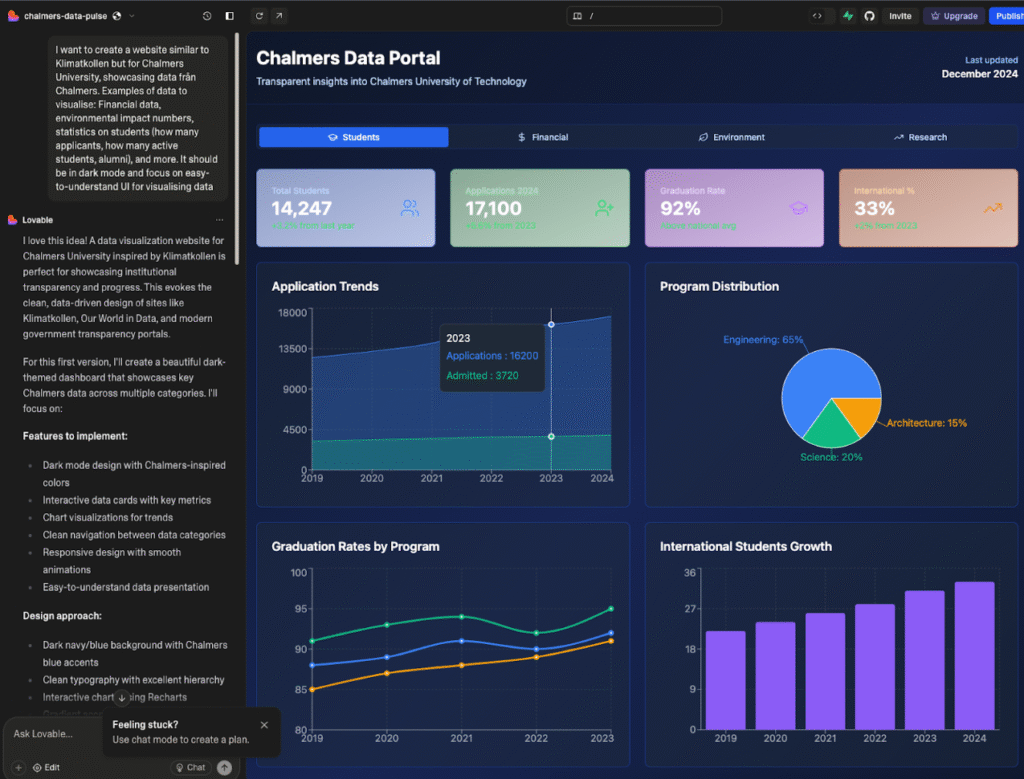
During the early ideation phases, tools such as Figma Make and Lovable can be used for quick prototyping. The prototypes won’t be good enough for the end product, but they can spark some ideas or directions.
- Use GenAI to ideate quickly on different concept ideas, solutions, and features
Tools to try: Lovable, Figma Make, v0, Framer
Content generation phase
For content, you can use generative AI to create text, images, videos, music, and sound effects.
Tools to try: ChatGPT & Claude (text), Pikalabs (video), HeyGen (video), Runway (video), Midjourney (video), Suno (music), Elevenlabs (voice/sound)
Design-to-code phase
One of the most groundbreaking areas of application is in the design-to-developer handoff phase. With the creation of MCP (Model Concept Protocols), we can now connect design prototypes in Figma to AI Code Agents such as Cursor and Claude Code. This enables two-way communication between the data source (e.g., a Figma design) and the AI code agent. Figma recently launched its own MCP server, which many companies are now using to connect to their code workflows.
- Use AI to transform your design mockups, sketches, or text descriptions into functional code
- Connect Figma with AI code agents for two-way syncs
Tools to try: Figma Make, Lovable, Claude Code, Replit, Cursor
Personal assistant
- AI could be used as a personal assistant or agent, autonomously performing routine and repetitive tasks.
- For example, recording interviews, transcribing, and giving summaries.
Tools to try: Sana, n8n
My Experimental AI-assisted Design Workflow
Note: This is not a finalized workflow, and I have not yet used this process in any paid design-based projects, only in explorative AI projects. This is an experimental AI-assisted design workflow. I aim to learn and understand how, when, and where generative AI might be useful in a UX/UI design process.
Currently, my co-creative process with AI begins with manual planning and brainstorming of a design concept. After the initial planning, I utilize large language models such as ChatGPT or Claude to flesh out my ideas into proper documents and plans. At this stage, I may ask an LLM to identify missing parts of my plan, to help ask me questions, and to correct any spelling and grammar in my texts.
Once I have my idea and plan of what I want to create, I have experimented with using Figma Make and Lovable to prompt GenAI to generate a prototype for me. These prototypes have always needed further iterations. Once I feel satisfied, bored, or frustrated with the generative AI workflow, I copy and paste the generated design into a Figma file and continue with manual iterations until I’m satisfied. I don’t think any of the AI-generated designs I’ve created have been anywhere near a finished product, but it has been cool to be able to generate functional “fun” prototypes.
If I want to create a functional prototype in code, I use Claude Code or Cursor. With Figma’s MCP servers, you can even connect your manually designed Figma file with an AI code agent. In an AI code agent, such as Cursor, I iterate in smaller increments based on my judgments and tastes, using the built-in AI agent. When I get bored or feel limited, I manually edit the code in VS Code or Cursor, switching between AI-assisted coding sessions and manual coding sessions.
In summary, I am experimenting with Generative AI in various parts of my design process. Right now, I don’t feel it’s good enough to replace manual design work. But I do find it very helpful for text processing and brainstorming in the early stages, before even opening Figma. I also feel like “vibe coding” and think it’s such a cool thing to play around with. I have noticed, though, that whenever I want to create a design that I actually want to publish somewhere as my own, I don’t use AI. I still use Figma to create things, sometimes from scratch or using my old designs as starting templates. I’m not sure if this means that AI isn’t up to par, or if I’m just so used to designing things manually that I can’t stop.
The Possibilities and Risks of Generative AI in Design Practice (According to Recent Research)
AI in UI/UX Design is used for early-stage tasks, offering speed and breadth but requiring human oversight, policies, and better evaluation.
To find out more about how other people use generative AI in design practice, I recently did a scoping literature review of recent (2021-2025) research on generative AI in design practice, to explore the questions “What is known from existing literature about how AI can be used in interaction design practice to support design practitioners? And what are prominent research gaps for future research?“.
Method
I searched Google Scholar and used the LLM-based chat in the Dia Browser to summarize and synthesize the papers in a table. This was also an experiment on how a quick literature review could be done using AI. The purpose was not to do it for an academic paper but to gain an overview of the subject area.
I am aware that LLM summaries can hallucinate, so I first scanned the abstracts of a total of 240 papers and selected 62 papers for inclusion. Due to the number of papers included, I think that even if the LLM hallucinates in some summaries of the paper content, I think the general overview can still be useful.
This is what I found:
- How genAI is used in practice: Predominantly for research synthesis, ideation, briefs, personas, storyboard/journey mapping, and low–mid fidelity prototyping; limited impact on convergent, high-fidelity, and evaluation phases.
- Possibilities: Faster iterations, broadened exploration and creativity, scalable personalization, and mixed‑initiative co‑creation across multimodal workflows.
- Risks and challenges: Hallucinations, bias and homogenization, design fixation on AI outputs, weak controllability/context retention, privacy/IP concerns, and skill degradation, especially for juniors.
- Proposed guidelines: Keep humans-in-the-loop with verification; clarify policies and data governance; match tool to phase and use structured prompts; surface explainability and provide contextual controls and transparency.
- Future research directions: Build journey/flow-aware datasets and evaluation benchmarks; study fixation mitigation and transparency; develop multi‑agent UX toolkits and prompt frameworks; run longitudinal org/education studies on adoption and skills.
What I found most interesting was the concept of design fixation. Design fixation occurs when designers become fixated on an AI-generated output, which can negatively affect the creativity of design solutions and lead to generic designs. To combat this, some papers suggest that designers can switch up the AI tools they use, the prompts, and also include non-AI-assisted design sessions.
Some interesting research papers on AI in design & design fixation:
- How generative AI supports human in conceptual design (Chen et al., 2025)
- Designing Interactions with Generative AI for Art and Creativity (Hu et al., 2025)
- Investigating How Generative AI Affects Decision-Making in Participatory Design (Joshi et al., 2024)
- The Effects of Generative AI on Design Fixation and Divergent Thinking (Wadinambiarachchi et al., 2024)
Internet Opinions on AI for UX/UI design
On discussions on Reddit, there seems to be a discrepancy between AI enthusiasts and skeptics. Scepticism comes from cases of AI being used to create the end solutions, with many designers claiming it just isn’t comparable to the quality of human designers. Enthusiasts, on the other hand, seem to emphasize AI as a tool and assistant for early-stage research, ideation, and UX writing.
Many designers, including me, are experimenting with using AI-assisted coding tools to create working prototypes of our designs. This is, to me, the most amazing application area. What if, in the future, designers could take their Figma mockups and prototypes and translate them into functional code using generative AI? This is where I stake my hopes and where I see a possible real change in the job dynamics of tech teams.
My Current Takeaways
Even with all the hype around these generative AI tools for design, they are not nearly good enough to replace human designers. This means that designers still need to do the work and evaluate the output from AI models. However, AI can be used as an assistant, a decision-support tool, or help with productivity along the way.
I see most potential in the intersection of design and front-end development. I think that MCPs might enable a new type of designer-developer handoffs and collaborations, and might even blur the lines in the future between these two roles.
Try GenAI yourself!
If you want to start exploring with AI in the design process, I’d recommend starting with the following tools:
For design iterations:
- Figma Make – Figma’s new AI prompting tool, where you can use natural language to generate design prototypes. You can copy the generated prototypes into Figma files to further manually edit them. Pretty cool stuff!
- Figma Sites
- Lovable
- Replit
For AI-vibe coding:
- Claude Desktop
- Claude Code – An AI code assistant in the terminal, with access to your code files, which affords it contextual awareness of the code you are working with. The generated code from Claude code in the terminal is truly incomparable to what you get from general LLM desktop tools (e.g. ChatGPT & Claude Desktop).
- Cursor – Another AI code assistant tool with an AI agent built into an interface similar to VS Code. This tool has been created for developers working in teams with bigger code bases. Also really great, and better for more detailed edits compared to Claude Code.
Links
- YouTube video: When Designers Start Shipping Real Code: Emmet Connolly from Intercom – This talk by Emmet Connolly includes many hands-on examples and inspiration on how you, as a designer, can start exploring with AI tools to build prototypes.
Stay tuned for updates on this page! Feel free to leave a comment if you’re experimenting with this as well.
Interesting research approach! For the video generation side of the workflow, makeaivideo.app is worth a look — it auto-selects the best model (Kling, Sora 2, Flux, etc.) based on your prompt, so you skip the manual benchmarking step. Good for quick design iteration and concept visualization. Free, no account needed.